Colors
The first two versions of Material Design provide a color system that have a preset of colors that generally look good together. The official Material palette generator can be used to generate a palette for any color you input.
Customizing Colors
The global theme colors can be configured by updating the default Sass variables with custom values.
Recommended setup
A recommended setup is creating a new _everything.scss file that @forwards
everything from react-md with any overrides required in the app and any
additional Sass helpers required for developing. Here is an example below
showcasing the default theme variables:
@use "@react-md/core/a11y";
@use "@react-md/core/colors";
@use "sass:color";

@forward "@react-md/core" with (
  $color-scheme: light,
  $primary-color: colors.$blue-500,
  $secondary-color: colors.$orange-a-400,
  $warning-color: colors.$deep-orange-a-400,
  $error-color: colors.$red-500,
  $success-color: colors.$green-a-700,
  $light-theme-background-color: #fafafa,
  $light-theme-surface-color: colors.$white,
  $light-theme-text-primary-color: color.adjust(colors.$black, $lightness: 13%),
  $light-theme-text-secondary-color: color.adjust(
      colors.$black,
      $lightness: 46%
    ),
  $light-theme-text-hint-color: color.adjust(colors.$black, $lightness: 66%),
  $light-theme-text-disabled-color: color.adjust(
      colors.$black,
      $lightness: 62%
    ),
  $dark-theme-background-color: #121212,
  $dark-theme-surface-color: #424242,
  $dark-theme-text-primary-color: color.adjust(colors.$white, $lightness: -15%),
  $dark-theme-text-secondary-color: color.adjust(
      colors.$white,
      $lightness: -30%
    ),
  $dark-theme-text-hint-color: color.adjust(colors.$white, $lightness: -50%),
  $dark-theme-text-disabled-color: color.adjust(colors.$white, $lightness: -50%)
);
Now @use this file throughout the app instead of @react-md/core to generate styles maintaining
the overridden theme and configuration.
@use "everything";

// generate all the styles
@include everything.styles;
Picking Colors
Official color tool
The Material Design Team have built a palette configuration tool: material.io/resources/color. This can help you create a color palette for your UI that is designed to be harmonious, ensure accessible text, and distinguish UI elements and surfaces from one another.
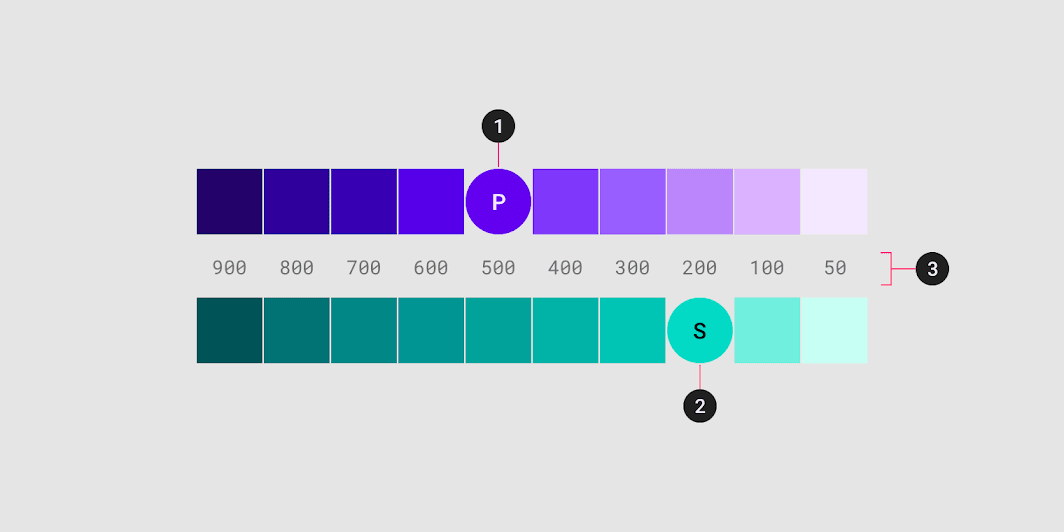
The output can be pasted into the Sass configuration:
@use "@react-md/core/a11y";
@use "@react-md/core/colors";
@use "sass:color";

@forward "@react-md/core" with (
  $primary-color: colors.$blue-500,
  $secondary-color: colors.$orange-a-400,
  $warning-color: colors.$deep-orange-a-400,
  $error-color: colors.$red-500,
  $success-color: colors.$green-a-700
);
Playground
To test a material.io/design/color color scheme with the ReactMD documentation, simpley select cololrs using the palette and sliders below. Alternatively, you can enter the hex values in the Primary and Secondary text fields.
The output shown below can be copied directly into the_everything.scss file to override the theme colors. Only the $primary-color and $secondary-color variables are required as the rest are automatically generated using the core.contrast-color Sass function.
@use "@react-md/core/a11y";
@use "@react-md/core/colors";
@use "sass:color";

@forward "@react-md/core" with (
  $primary-color: colors.$teal-500,
  $secondary-color: colors.$pink-a-200
);
Color Palette
react-md still supports this color system by providing both Sass and
Javascript variables where Sass variables will use kebab-case-names and
Javascript will use camelCaseNames. The Sass variables can be accessed
through @use "@react-md/core/colors"; and the Javascript variables can
be accessed through import { colorName } from "@react-md/core/theme/colors";.
To help show the naming conventions and usage, all the available red colors will be shown below:
@use "@react-md/core/colors";

.example {
  color: colors.$red-50;
  color: colors.$red-100;
  color: colors.$red-200;
  color: colors.$red-300;
  color: colors.$red-400;
  color: colors.$red-500;
  color: colors.$red-600;
  color: colors.$red-700;
  color: colors.$red-800;
  color: colors.$red-a-100;
  color: colors.$red-a-200;
  color: colors.$red-a-400;
  color: colors.$red-a-700;
}
.example {
color: #ffebee;
color: #ffcdd2;
color: #ef9a9a;
color: #e57373;
color: #ef5350;
color: #f44336;
color: #e53935;
color: #d32f2f;
color: #c62828;
color: #ff8a80;
color: #ff5252;
color: #ff1744;
color: #d50000;
}import {
red50,
red100,
red200,
red300,
red400,
red500,
red600,
red700,
red800,
red900,
redAccent100,
redAccent200,
redAccent400,
redAccent700,
} from "@react-md/core/theme/colors";
Material Design Colors
- Red500#F44336
- 50#FFEBEE
- 100#FFCDD2
- 200#EF9A9A
- 300#E57373
- 400#EF5350
- 500#F44336
- 600#E53935
- 700#D32F2F
- 800#C62828
- 900#B71C1C
- A100#FF8A80
- A200#FF5252
- A400#FF1744
- A700#D50000
- Pink500#E91E63
- 50#FCE4EC
- 100#F8BBD0
- 200#F48FB1
- 300#F06292
- 400#EC407A
- 500#E91E63
- 600#D81B60
- 700#C2185B
- 800#AD1457
- 900#880E4F
- A100#FF80AB
- A200#FF4081
- A400#F50057
- A700#C51162
- Purple500#9C27B0
- 50#F3E5F5
- 100#E1BEE7
- 200#CE93D8
- 300#BA68C8
- 400#AB47BC
- 500#9C27B0
- 600#8E24AA
- 700#7B1FA2
- 800#6A1B9A
- 900#4A148C
- A100#EA80FC
- A200#E040FB
- A400#D500F9
- A700#AA00FF
- Deep Purple500#673AB7
- 50#EDE7F6
- 100#D1C4E9
- 200#B39DDB
- 300#9575CD
- 400#7E57C2
- 500#673AB7
- 600#5E35B1
- 700#512DA8
- 800#4527A0
- 900#311B92
- A100#B388FF
- A200#7C4DFF
- A400#651FFF
- A700#6200EA
- Indigo500#3F51B5
- 50#E8EAF6
- 100#C5CAE9
- 200#9FA8DA
- 300#7986CB
- 400#5C6BC0
- 500#3F51B5
- 600#3949AB
- 700#303F9F
- 800#283593
- 900#1A237E
- A100#8C9EFF
- A200#536DFE
- A400#3D5AFE
- A700#304FFE
- Blue500#2196F3
- 50#E3F2FD
- 100#BBDEFB
- 200#90CAF9
- 300#64B5F6
- 400#42A5F5
- 500#2196F3
- 600#1E88E5
- 700#1976D2
- 800#1565C0
- 900#0D47A1
- A100#82B1FF
- A200#448AFF
- A400#2979FF
- A700#2962FF
- Light Blue500#03A9F4
- 50#E1F5FE
- 100#B3E5FC
- 200#81D4FA
- 300#4FC3F7
- 400#29B6F6
- 500#03A9F4
- 600#039BE5
- 700#0288D1
- 800#0277BD
- 900#01579B
- A100#80D8FF
- A200#40C4FF
- A400#00B0FF
- A700#0091EA
- Cyan500#00BCD4
- 50#E0F7FA
- 100#B2EBF2
- 200#80DEEA
- 300#4DD0E1
- 400#26C6DA
- 500#00BCD4
- 600#00ACC1
- 700#0097A7
- 800#00838F
- 900#006064
- A100#84FFFF
- A200#18FFFF
- A400#00E5FF
- A700#00B8D4
- Teal500#009688
- 50#E0F2F1
- 100#B2DFDB
- 200#80CBC4
- 300#4DB6AC
- 400#26A69A
- 500#009688
- 600#00897B
- 700#00796B
- 800#00695C
- 900#004D40
- A100#A7FFEB
- A200#64FFDA
- A400#1DE9B6
- A700#00BFA5
- Green500#4CAF50
- 50#E8F5E9
- 100#C8E6C9
- 200#A5D6A7
- 300#81C784
- 400#66BB6A
- 500#4CAF50
- 600#43A047
- 700#388E3C
- 800#2E7D32
- 900#1B5E20
- A100#B9F6CA
- A200#69F0AE
- A400#00E676
- A700#00C853
- Light Green500#8BC34A
- 50#F1F8E9
- 100#DCEDC8
- 200#C5E1A5
- 300#AED581
- 400#9CCC65
- 500#8BC34A
- 600#7CB342
- 700#689F38
- 800#558B2F
- 900#33691E
- A100#CCFF90
- A200#B2FF59
- A400#76FF03
- A700#64DD17
- Lime500#CDDC39
- 50#F9FBE7
- 100#F0F4C3
- 200#E6EE9C
- 300#DCE775
- 400#D4E157
- 500#CDDC39
- 600#C0CA33
- 700#AFB42B
- 800#9E9D24
- 900#827717
- A100#F4FF81
- A200#EEFF41
- A400#C6FF00
- A700#AEEA00
- Yellow500#FFEB3B
- 50#FFFDE7
- 100#FFF9C4
- 200#FFF59D
- 300#FFF176
- 400#FFEE58
- 500#FFEB3B
- 600#FDD835
- 700#FBC02D
- 800#F9A825
- 900#F57F17
- A100#FFFF8D
- A200#FFFF00
- A400#FFEA00
- A700#FFD600
- Amber500#FFC107
- 50#FFF8E1
- 100#FFECB3
- 200#FFE082
- 300#FFD54F
- 400#FFCA28
- 500#FFC107
- 600#FFB300
- 700#FFA000
- 800#FF8F00
- 900#FF6F00
- A100#FFE57F
- A200#FFD740
- A400#FFC400
- A700#FFAB00
- Orange500#FF9800
- 50#FFF3E0
- 100#FFF0B2
- 200#FFCC80
- 300#FFB74D
- 400#FFA726
- 500#FF9800
- 600#FB8C00
- 700#F57C00
- 800#EF6C00
- 900#E65100
- A100#FFD180
- A200#FFAB40
- A400#FF9100
- A700#FF6D00
- Deep Orange500#FF5722
- 50#FBE9E7
- 100#FFCCBC
- 200#FFAB91
- 300#FF8A65
- 400#FF7043
- 500#FF5722
- 600#F4511E
- 700#E64A19
- 800#D84315
- 900#BF360C
- A100#FF9E80
- A200#FF6E40
- A400#FF3D00
- A700#DD2C00
- Brown500#795548
- 50#EFEBE9
- 100#D7CCC8
- 200#BCAAA4
- 300#A1887F
- 400#8D6E63
- 500#795548
- 600#6D4C41
- 700#5D4037
- 800#4E342E
- 900#3E2723
- Grey500#9E9E9E
- 50#FAFAFA
- 100#F5F5F5
- 200#EEEEEE
- 300#E0E0E0
- 400#BDBDBD
- 500#9E9E9E
- 600#757575
- 700#616161
- 800#424242
- 900#212121
- Blue Grey500#607D8B
- 50#ECEFF1
- 100#CFD8DC
- 200#B0BEC5
- 300#90A4AE
- 400#78909C
- 500#607D8B
- 600#546E7A
- 700#455A64
- 800#37474F
- 900#263238
- Blackblack#000000
- Whitewhite#FFFFFF